

Looking for a Stretchly alternative for an Apple silicon Mac? Have You Rested? has a free timer: a 20-second break every 20 minutes. Pro can use the camera to pause a break when you look back. It needs macOS 13 or later. Stretchly is still useful if you want to set your own times or use other computers.
We make Have You Rested?. We'd keep Stretchly if you want the same app on Mac, Windows and Linux. We'd try Have You Rested? if you keep looking back before a break ends. Neither app can prove that a completed countdown has improved your health. Choose the one that helps you take the break you planned.
The Homebrew result needs context
As checked on 30 September 2026, the default Homebrew Stretchly cask is disabled. That means this install route is closed. It does not mean the app is gone. The developer still offers another route. You don't need to switch apps just because the default cask will not install.
The developer maintains a separate Homebrew tap, documented with this command:
brew install --cask hovancik/stretchly/stretchly
We checked the developer's instructions. We have not run this command on your Mac. The Mac app is unsigned, so macOS may ask for approval when you first open it. Read the current instructions before you install it. This guide does not ask you to remove download protections or change your Mac's security settings.
If your existing installation works, there is no reason to uninstall it before comparing alternatives. Keep its interval settings written down. Changing the reminder app and the schedule together makes it harder to see which change actually suits your work.
A timer problem or a break problem?
A reminder can arrive on time and still get closed at once. Or you might let it finish while reading another monitor. If you keep closing it, try a better schedule or a prompt that is harder to skip. If you take the break but keep reading, decide where to look instead. A camera check can help, but it can make mistakes.
Stretchly offers short and long breaks, times you can change and strict-mode options. Those are meaningful reasons to keep it. Its official documentation covers the settings and supported platforms. Check those before assuming that a different app is needed for a reminder that is harder to close.
Stretchly is free and open source under the BSD 2-Clause license, with downloads for macOS, Windows and Linux. Its current Mac instructions require macOS 12 or later. Have You Rested? is a native Mac app with a free timer and paid Pro features, and requires Apple silicon with macOS 13 or later.
Have You Rested?'s free eye-break timer uses a fixed 20-second break every 20 minutes. Pro adds custom timing and breaks checked by the camera. Free suits that one schedule. It does not replace all the schedules you can set in Stretchly. If you want a free timer with your own times, check that before switching.
There is no strict mode in Have You Rested? that prevents you from leaving a break. You can skip or postpone it. Verification changes what advances the countdown when a usable camera signal is available; it doesn't take away your control of the Mac.
When Pro pauses a break
During a Pro eye break, detected looking at the Mac pauses the countdown. Looking away can let it run. Detected looking down also pauses it. The app uses the position of your head and eyes to estimate where you look. It does not recognize a phone in your hands.
This matters if you usually check your phone during a break. A camera can still miss a glance. Its position and the lighting affect the result. It cannot measure how far away your eyes focus. Another display outside its view may look like looking away. Treat the check as a reminder to follow your plan, not proof of how you spent every second.
If the camera cannot give a useful result, the app counts time instead. Free and preview breaks also use a timer. Finishing one of these countdowns does not mean the camera checked your break.
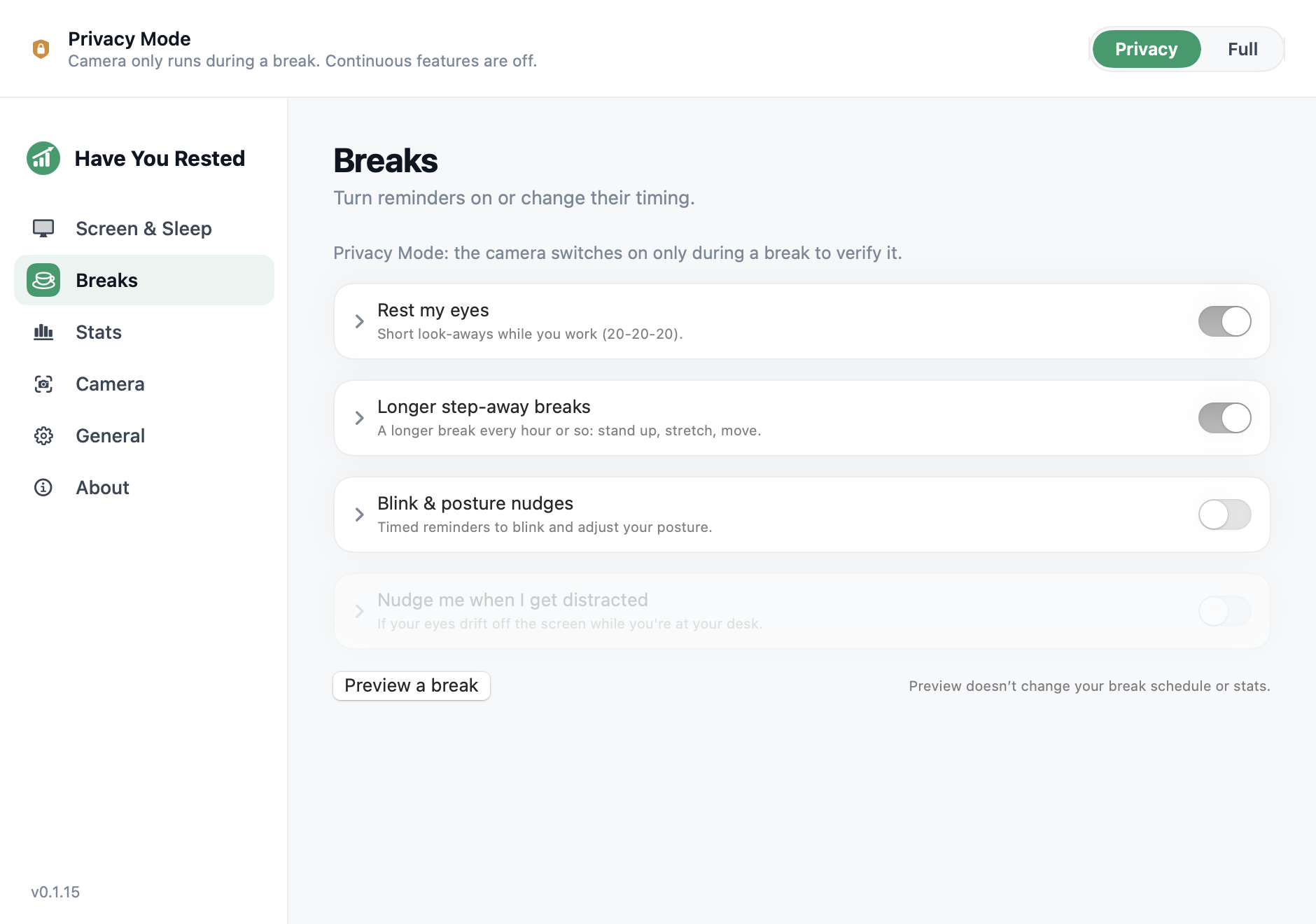
The settings screenshot is useful for finding the controls. Its Preview button shows the overlay without changing the real break schedule or statistics. Preview always runs as a timer, so it cannot demonstrate a look-back pause. Testing verification requires a real Pro break with an available camera signal.
Decide when the camera can run
Have You Rested? Free does not use the camera. Pro's Privacy Mode keeps it off while you work. It can turn on during a break to check whether you look away. Full Mode uses the camera between breaks too. It can control the display and show time at the Mac. Privacy Mode does not mean the camera stays off through a Pro trial.
If you want the camera off throughout, leave macOS camera permission disabled. The camera-free setup guide walks through the permission choice and the timer fallback. Choose that first, rather than granting access just to try the timer.
The Mac app has no analytics. It processes camera frames locally and discards them; it does not record or upload video. License checks and optional update checks still use the internet. The website has its own analytics, so “no analytics in the app” should not be read as a statement about every page you visit.
Try a replacement without two competing reminders
- Check your Mac first. Have You Rested? requires Apple silicon and macOS 13 or later. It does not support Intel Macs, Windows or Linux.
- Write down what you want to fix: too many interruptions, skipping, or returning to the screen mid-break. Keep the goal specific enough to compare after a work session.
- Pause Stretchly's reminders while testing the other app. Two schedules at once can turn the comparison into a test of how many popups you tolerate.
- Follow the Mac setup instructions. Choose camera-free timing first if that is your preference; use a real Pro break only if you want to try the camera check.
- Review the result against your original goal. If the issue was simply dismissing reminders, read about timer reminders, strict mode and verified breaks before adding more restrictions.
A new install includes a five-day Pro trial without a card, starting with its first successful online launch. Afterwards the free timer remains available. Current Pro pricing is US$29.99 lifetime for up to two Macs, US$19.99 a year or US$2.99 a month. Check the current plans before choosing a paid option.
Questions before you switch
Is Stretchly discontinued because Homebrew disabled its cask?
The disabled default cask is not evidence that Stretchly is discontinued. The developer documents a separate tap and release downloads. Use those primary sources to check the current installation route.
Does Have You Rested? run on every Mac?
No. It requires an Apple silicon Mac with macOS 13 or later. If you need Intel or another operating system, it is not a suitable replacement.
Can I use the alternative without a camera?
Yes. The free timer uses no camera. To avoid any camera use during the Pro trial too, leave macOS camera permission disabled; Pro Privacy Mode can otherwise use the camera during breaks.
Does verification stop me from skipping a break?
No. Have You Rested? keeps skip and postpone controls. With a usable Pro camera signal, verification pauses the eye-break countdown when looking at the Mac or looking down is detected. It cannot verify viewing distance.
If a native 20-20-20 timer fits your Mac and your routine, try the free download. Keep Stretchly if its configurable reminders already do the job.