
Free eye-break reminder for Mac
Look away.
Make it count.
In Pro, your break countdown pauses while you look at your Mac. Look away, and it runs.
Free timer forever. Try Pro for 5 days. No card.

With Pro verification, the countdown pauses when you look back.
The screen stays on as long as you're looking at it.
Looking away can switch off the display without sleeping the Mac.
Knowing the rule isn't the hard part
The 20-20-20 rule is simple: every 20 minutes, look at something about 20 feet away for 20 seconds. The difficult part is stopping when you're busy instead of dismissing another reminder. Have You Rested puts the break on a timer and, if you choose camera verification, pauses that timer when you look back too soon.
Set up your first 20-20-20 reminder, or read the American Optometric Association's guidance. The app supports a break routine; it does not diagnose or treat eye conditions.
Three states, read from your camera
Apple Vision checks head pose and eye position locally at 1–2 fps. Frames are discarded immediately. The app keeps only the current state: looking, present but turned away, or absent.
Looking
Display on, Mac awake. The break countdown ticks.
Screen onHere, not looking
Display turns off; the Mac stays awake for your builds and downloads.
Screen offStepped away
No face for a while, so the Mac can sleep. Tap a key or the trackpad when you return.
Mac sleepsEye breaks on the 20-20-20 rule
Every 20 minutes, look about 20 feet away for 20 seconds. A 15-second warning appears before the break starts.
- Timed 20-20-20 micro-breaks
- A 15-second warning before each break
- Optional long breaks for stretching
- Free uses fixed 20-minute / 20-second eye breaks; Pro adds custom timing
A break only counts while you look away
Turn on camera verification and the countdown follows what you do. Look back at the screen or down at your phone and it pauses; look into the distance and it continues.
- Camera-verified: the timer runs only while you look away
- Peek back at the screen → the countdown pauses
- Look down at your phone → doesn't count as rest
- With a usable camera signal, the countdown pauses when you look back. Detection can miss a glance; without that signal, it uses a regular timer.
Screen on when you look, off when you don't
While you're looking, the display stays on. Turn away and only the display switches off, so builds and downloads keep running. Leave for longer and the Mac can sleep.
- Screen stays on while you're looking
- Screen off when you glance away, Mac stays awake
- Mac sleeps after no face is detected for your chosen delay
- Look back and an awake Mac restores the screen
Reminders to blink, sit up, and refocus
Short reminders shown without taking over the screen. Want the camera dark? Privacy Mode runs breaks on a plain timer with no continuous camera at all.
- Blink and posture reminders
- Pro Focus nudge when you drift off the screen
- Privacy Mode runs as a plain timer, no continuous camera
Keep the defaults or change the timing
Break length, detection sensitivity, work hours, battery behavior, and call pausing are all set in one window.
What the camera sees never leaves your Mac
Each frame is read locally by Apple Vision, reduced to a single state (looking, present, or away) and discarded. Nothing is recorded, shown, or uploaded, and there's no account and no analytics in the Mac app. The app contacts have-you-rested.rolia.ee for Pro license checks and, only if you enable it, Sparkle update checks. The only identifying data in activation is your purchase email and an anonymous device hash used to enforce the 2-Mac limit.
Set up breaks without a camera
Schedule, battery, calls, stats
Work-hours schedule
Runs only during the hours you set.
Auto-pause on battery
Stops watching when you're unplugged, to save power. Resumes when you charge.
Pauses during calls
Holds the break countdown while a detected video call is active.
Daily screen-time stats
Time looking, focus streak, and breaks taken, right in the menu bar. Resets each day.
Tunable sensitivity
Low, medium, or high: how much head movement counts as looking away.
One-time calibration
Calibration records your head angles while facing the screen and while turned away.
What runs in each mode
Eye breaks plus blink and posture reminders are always free. Pro adds camera-based presence detection. In Privacy Mode the camera is used only to check a break; in Full Mode it runs continuously.
| Feature | Freetimer only | Privacy Procamera per break | Full Procontinuous |
|---|---|---|---|
| Eye health | |||
| Timed 20-20-20 eye breaks | |||
| Long breaks & 15-second warning | |||
| Blink & posture nudges | |||
| Camera-verified breaks: countdown pauses if you peek | — | ||
| Presence & power | |||
| Continuous presence tracking | — | — | |
| Screen stays on while you look | — | — | |
| Screen off when you look away | — | — | |
| Mac sleeps when you step away | — | — | |
| Wake-on-look while the Mac is awake | — | — | |
| Insight & control | |||
| Focus streak & distraction nudges | — | — | |
| Daily screen-time stats | — | — | |
| Work-hours, battery & call pausing | — | — | |
| Sensitivity & one-time calibration | — | — | |
| Camera use | Never on | Only during a break | Continuous · 1–2 fps |
Free never turns the camera on at all. Pro includes both modes: pick Privacy or Full when you start, switch anytime in Settings.
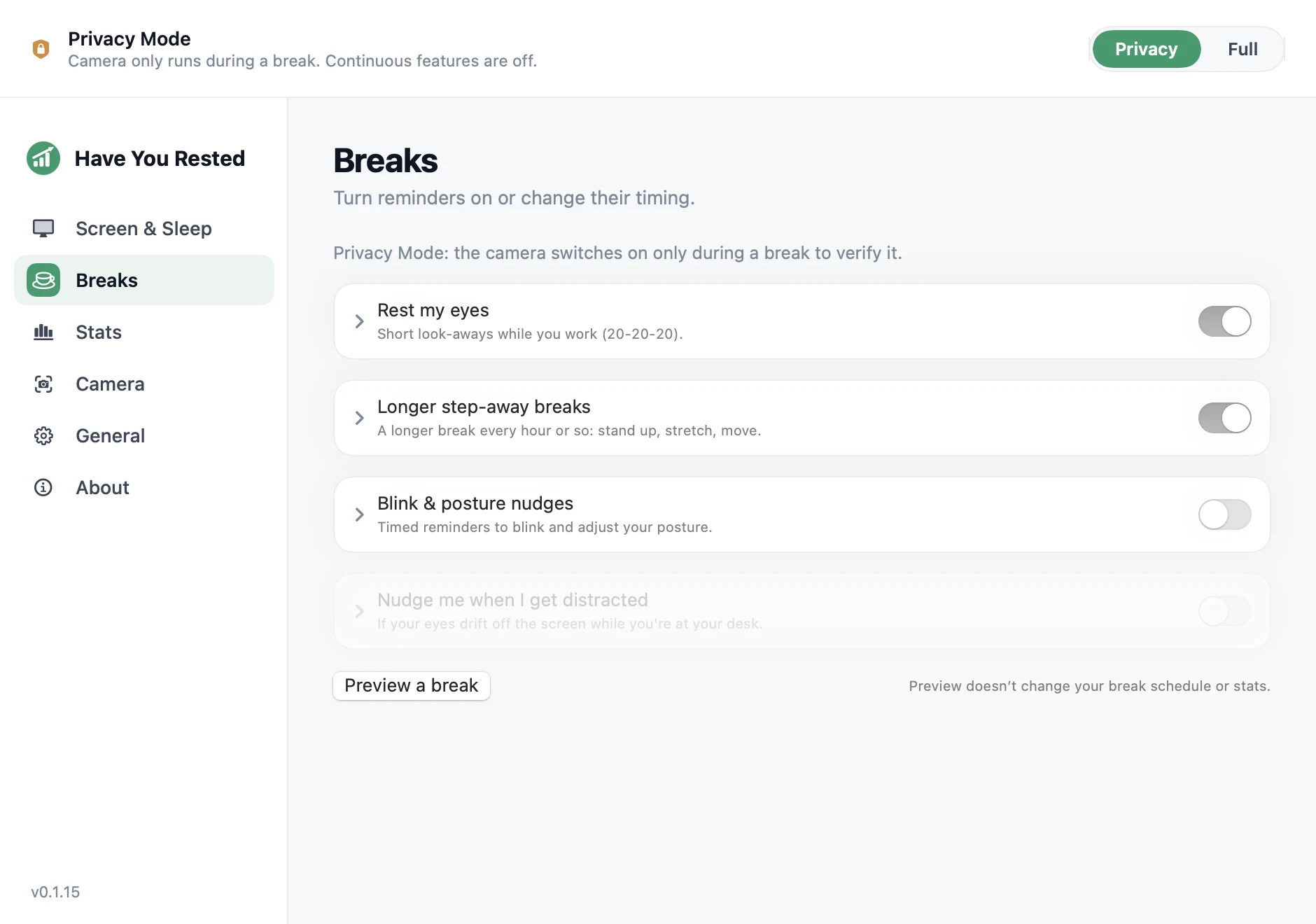
The timer is free. Pro checks the break.
Free includes 20-20-20 breaks plus blink and posture reminders. Pro can pause the countdown when you look back and adds display control, wake-on-look while the Mac remains awake, focus tracking, and daily presence stats.
Try Pro free for 5 days. The trial starts the first time you open the app online. No card.
Free
- Timed 20-20-20 eye breaks
- Blink & posture nudges
- Privacy Mode: timer only, no camera
Subscription
- Everything in Free
- Camera-verified breaks that pause when you peek
- Screen off when you look away
- Wake-on-look while the Mac is still awake
- Focus tracking & daily presence stats
Email delivery and purchase emails are currently in English.
Monthly and Yearly renew automatically. Cancel anytime.
Lifetime
- Everything in Free
- Camera-verified breaks that pause when you peek
- Screen off when you look away
- Wake-on-look while the Mac is still awake
- Focus tracking & daily presence stats
Email delivery and purchase emails are currently in English.
One payment. No renewal.
Prices in USD. Taxes may apply and are calculated at checkout.
You fund the next feature
Pro sales fund development. Users vote in the Telegram chat, and each milestone below starts when the listed number of people have bought Pro.
-
25 Pro users
Adaptive break timing
Breaks wait until you pause your work, and time already spent looking away counts as rest.
-
50 Pro users
Shortcuts & automation
Pause, start a break, switch modes or read your focus stats from Apple Shortcuts and your own scripts.
-
100 Pro users
Break history & trends
Weeks of break and focus history in one place, with export. See how your rest habit actually changes over time.
-
175 Pro users
Focus-aware profiles
Stricter monitoring in a work Focus, Privacy Mode in a meeting Focus, switched automatically.
-
300 Pro users
Posture trends
Posture stops being a nudge and becomes a daily chart: see when you start slouching.
-
500 Pro users
Rest with friends
Private rooms by invite code: compare break streaks with your team. Opt-in, no accounts, no public leaderboards.
-
750 Pro users
iPhone companion
Grabbing your phone the second a break starts won't pass as rest. Pairs locally over your own Wi‑Fi, opt-in.
Frequently asked questions
Is any video recorded or sent anywhere?
No. Frames are analysed on-device, in memory, and immediately discarded. Nothing is recorded, shown or uploaded. The only output is a coarse state: looking, present, or away.
Does the app ever connect to the internet?
Yes, but only to have-you-rested.rolia.ee. Detection, breaks, and stats stay on-device. Network access is used for license checks and, if you enable it, Sparkle update checks. Restoring a purchase sends your purchase email; activation uses a one-way hardware hash to enforce the 2-Mac limit.
What's free versus Pro?
Free includes timed 20-20-20 breaks plus blink and posture reminders; the camera stays off. Pro adds display control, wake-on-look while the Mac remains awake, verified breaks, focus tracking, and daily stats. Every new install includes Pro for 5 days without asking for a card.
How can the screen be off while my Mac keeps working?
Turning the display off and putting the Mac to sleep are two different things in macOS. When you glance away, Have You Rested turns off only the display: downloads, builds, and calls keep running underneath. Only when you actually leave does it let the whole Mac fall asleep.
Can it tell when I'm looking versus on my phone?
It uses head pose and eye landmarks to estimate whether you're looking at the Mac. Looking down can count as not looking at the screen, but Pro's verified eye-break countdown pauses when downward gaze is detected. It doesn't identify phones or measure viewing distance, and detection can miss a glance. You can tune the sensitivity.
Does the camera light have to stay on?
Apple ties the green light to camera use at the hardware level. In Full Mode it stays on while detection runs. To keep it off most of the time, choose an intermittent camera mode or use Privacy Mode, where Pro turns the camera on only during a verified break.
When I look back, it asks for my password. Why?
That's a macOS setting. Set System Settings → Lock Screen → "Require password after…" to a grace period at least as long as your screen-off delay. While the Mac is still awake, looking back can restore the display without showing the login screen. After full sleep, tap a key or the trackpad.
Which Macs are supported?
Any Apple silicon Mac running macOS 13 or later. A front camera is needed only for the Pro presence features; the free timer tier works without one. Intel Macs, Windows, Linux, iPhone, and Android are not currently supported. See the Mac setup guide.
Find the right fit for your Mac
A different timer isn't always the answer. Compare the features you actually use.
Set up eye-break reminders
The 20-20-20 routine, camera choices, and what stays free.
Mac setup guide →Coming from LookAway?
Compare verified breaks with the reminders and phone companion you already know.
LookAway comparison →Using Time Out?
Decide whether you need custom break routines or a check that you looked away.
Time Out comparison →Keeping your Mac awake?
When presence-based display sleep fits better than a keep-awake session.
Amphetamine comparison →So, have you rested today?
20-20-20 breaks, blink reminders, and posture reminders stay free. The first 5 days also include Pro.
Email delivery and purchase emails are currently in English.